top of page


RECORDING INSTRUCTIONS
To assure a high-quality recording follow the instructions below


-
You should be seated and relaxed in a room with comfortable temperature
-
Do not move or talk during the recording.
-
Use your smartphone's camera app in video mode with the flashlight on.
-
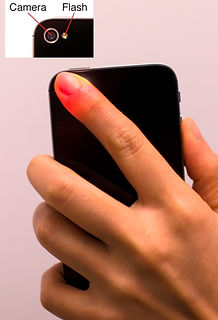
Place your finger gently in contact with the rear camera lens.
-
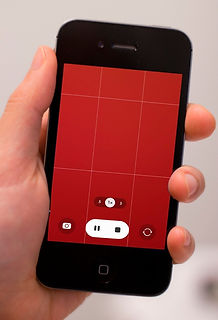
Your screen must be all light red
-
Record for about 30 seconds
ATTENTION: The screen must display a bright red image, and the flashlight must be on, as shown in the image below.
Examples:
bottom of page